
Independent product
Source Compare
Source Compare is a collaborative image-versioning tool I built to give visual work a clear history: alternatives, votes, and the approved result in one shared record.
The problem
The file rarely carried the whole decision.
Saving another image was easy. Preserving what that image represented was harder.
On a solo project, filenames and folders hold the process together for a while, as long as the discipline holds. As revisions accumulate, names begin carrying more and more hidden meaning: which version came first, which one is current, which alternatives belong together, and whether “final” actually means final.
Once several people are involved, that context fragments further. The files live in cloud storage, feedback arrives through chat or email, and approval happens in a meeting or another design tool. Each system keeps one piece of the work. None of them keeps the relationship between the alternatives and the direction the team picked.
- Filenames carried accidental meaning
- Names such as
final,final-v2, andfinal-approvedmade files distinct, but required everyone to interpret the same informal convention correctly. - Storage preserved files, not relationships
- Folders and version history kept older assets without showing which images were alternatives in the same round, or how one round led to the next.
- Feedback drifted away from the asset
- Comments in chat, email, and meetings named an exact image at the time, then drifted loose from the version they described.
- Approval hid the path
- The finished image survived. The rejected alternatives, the team's preferences, and the order of the decisions that produced it did not.
Source Compare focused on that missing structure: keeping visual alternatives, rounds of work, team votes, and the approved result connected in one navigable record.
The product model
A hierarchy for both the asset and its decisions.
Source Compare organizes work as a small, explicit hierarchy. Each level answers a different question, from the broad body of work down to one uploaded image.
- ProjectThe shared body of work and its collaborators.
- ItemOne asset that needs to move toward approval.
- VersionA round of edits in the item’s history.
- Iteration / commitOne concrete image alternative inside that round.
In the data model, a commit stores both its version and iteration number. Source Compare treats that commit as the particular image being reviewed.
The project view
Approved work stays distinct from work in progress.
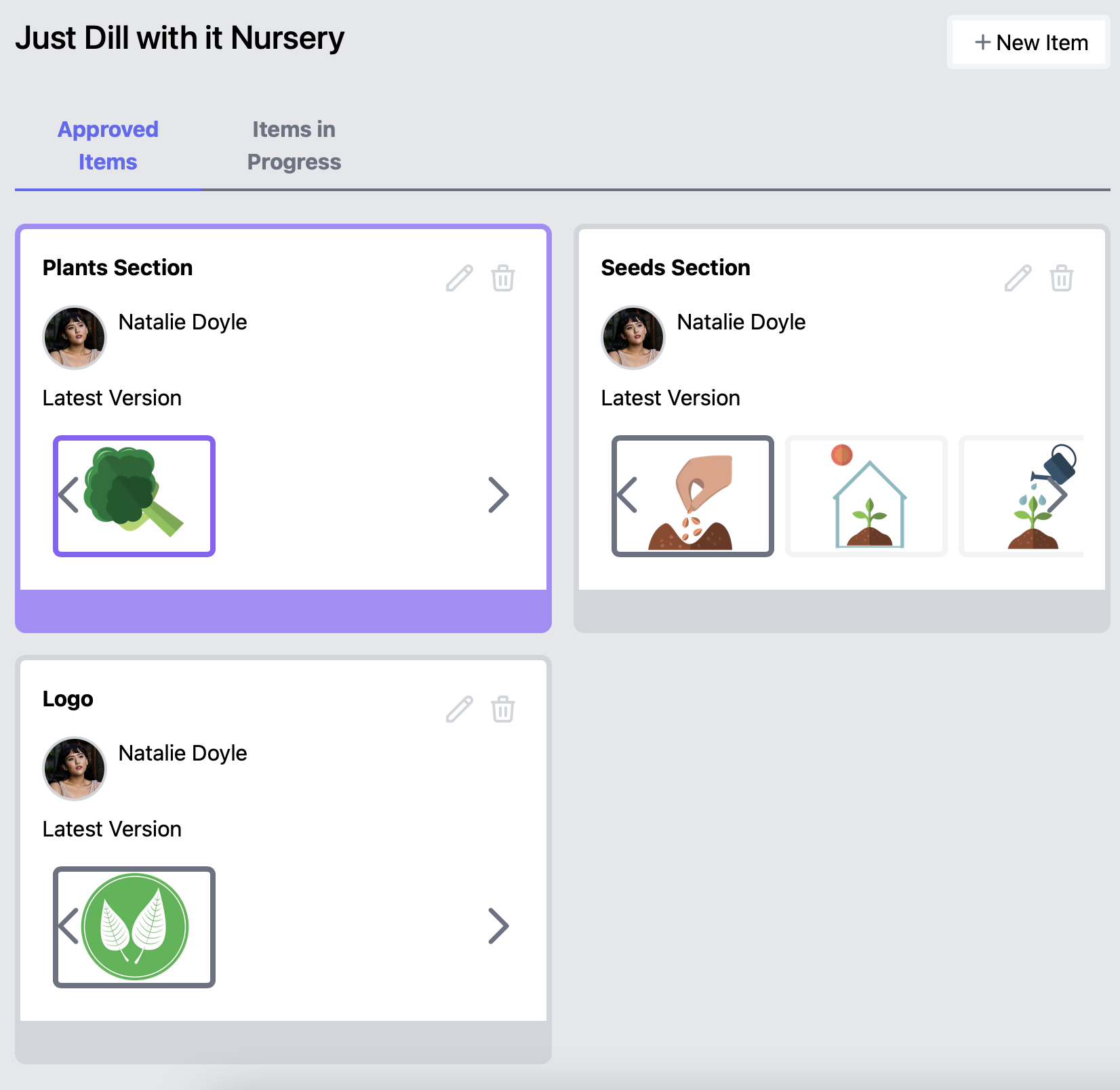
A project opens to its approved items: assets that have reached a final decision. A second view holds the items still gathering versions and votes. That separation keeps the current deliverables visible without erasing the work that produced them.
The working view
The history and the current choice share one screen.
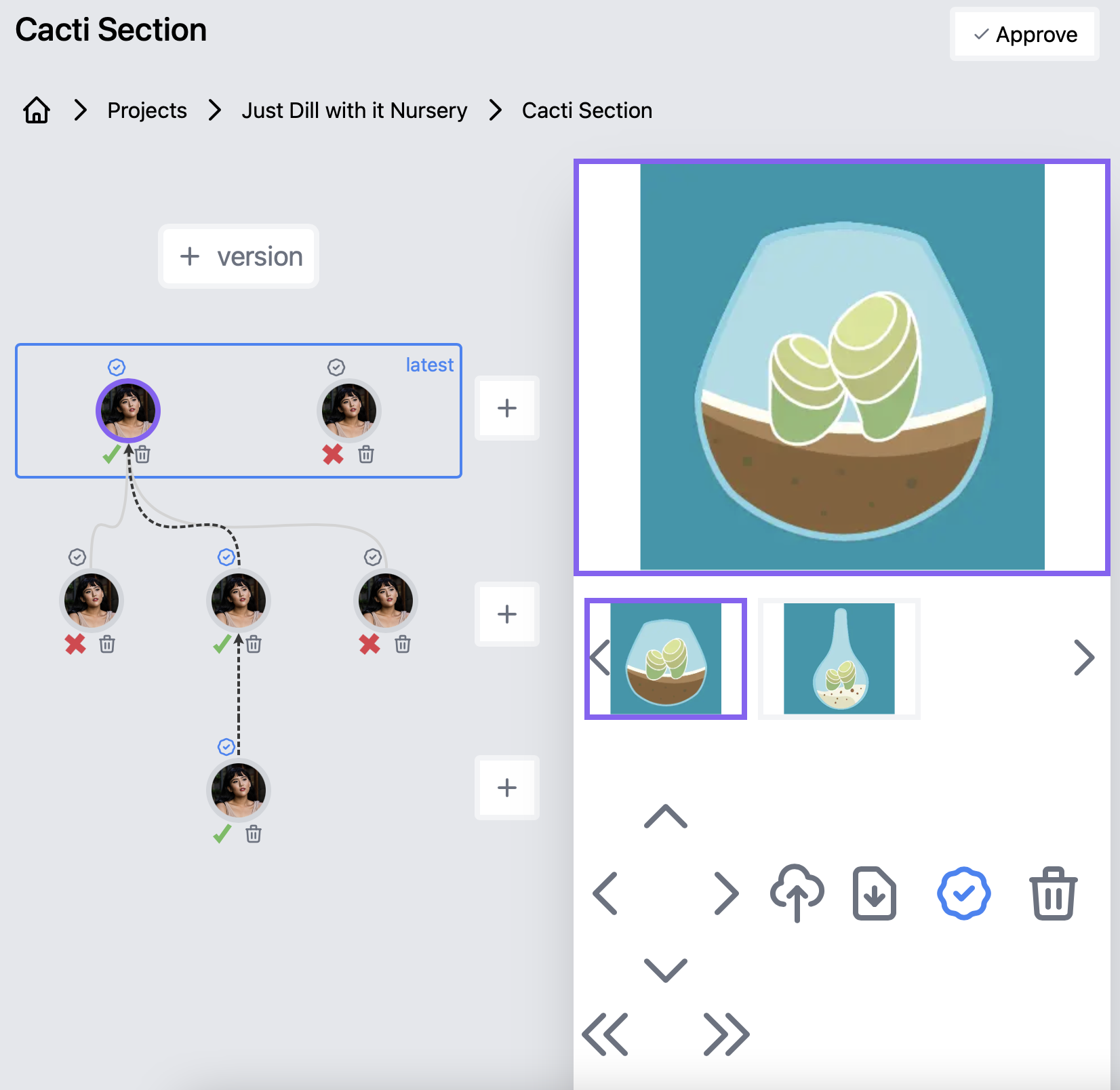
The item-detail view pairs a version tree with the selected image. Alternatives from the current version sit beside it, while upload, download, voting, navigation, and approval remain available in context.
Voting through versions
The votes draw a path through the tree.
Each collaborator can vote for one iteration within a version. Source Compare finds the most-voted alternative in each round and connects those choices into a path through the version tree.
Ties appear as yellow dotted branches. When a vote changes, the path redraws to reflect the new preference. Approval records the chosen endpoint and moves the item into the project’s approved view.
Implementation
A full-stack system for relational state and image storage.
I built it with a Next.js and React interface, an Apollo GraphQL API, a Prisma data layer backed by PostgreSQL, and S3-presigned image uploads. GraphQL Shield rules checked authentication and project membership around reads, uploads, voting, and mutations.
Collaboration uses two related scopes. A friendship establishes a reusable relationship between people, while follower records grant access one project at a time. Accepting a friend request confirms any pending project invitation from that person; it does not expose every project either person owns.
- Next.js + React
- Apollo GraphQL
- Prisma + PostgreSQL
- Amazon S3 uploads
- GraphQL Shield permissions
Looking back
Complex frontend work is mostly state with consequences.
Source Compare made that lesson concrete. A vote changed the preferred path; an approval changed how an item appeared at the project level; a permission decision affected which transitions a person could make at all.
The lesson was to model those transitions explicitly and enforce them below the interface layer. The page could walk someone through a complicated workflow, but the data and authorization rules still had to make contradictory states hard to create.